
Day 2 of 5 · 4 hours
SQL — querying real databases {: .hero-day__title }
Everything you did with XLOOKUP and pivots, rewritten as queries that scale. Join four tables, aggregate millions of rows, crack the Olist database.
Duration: 4 hours
Prerequisites: Day 1 (you’ve seen pivot tables, joins between sheets, and aggregation in Excel — SQL is the same thinking written down)
Learning goals: by end of day you can write SELECT statements against a real database, join 3–4 tables, group + aggregate, and use a CTE to break a hard query into readable steps.
Why SQL after Excel?
Everything you did with XLOOKUP and pivot tables in Excel has a direct SQL equivalent — and SQL scales to millions of rows where Excel chokes. By the end of today you’ll do in 3 lines of SQL what took 5 clicks and 2 columns in Excel.
| Excel | SQL equivalent |
|---|---|
XLOOKUP | JOIN |
SUMIFS | SELECT SUM() ... WHERE ... GROUP BY ... |
| Filter button | WHERE |
| Pivot table | GROUP BY + aggregates |
| Sort | ORDER BY |
Tooling: SQLite
We use SQLite — the simplest possible “real” database. One file (olist.db), no server, runs everywhere. You already have it: it’s built into macOS, Linux, and Python.
Setup (5 minutes, do once):
- Make sure the CSVs are downloaded —
bash data/olist/download.sh - Build the database (loads all 8 CSVs into one
.dbfile):cd data/olist sqlite3 olist.db < load_into_sqlite.sql - Confirm it worked:
sqlite3 olist.db "SELECT COUNT(*) FROM orders"
# → 99441
Two ways to query:
| Tool | Best for |
|---|---|
| DB Browser for SQLite (GUI, free) | Beginners — looks like Excel for databases. Type query, click run, see results. Recommended for class. |
sqlite3 CLI | Comfortable terminal users — faster for batch queries |
Open the database in DB Browser: File → Open Database → pick data/olist/olist.db. Then “Execute SQL” tab.
Table names
The loader gives the eight Olist tables short, query-friendly names:
| Table | What it holds |
|---|---|
orders | One row per order |
items | One row per line item |
reviews | One row per review |
customers | Customer info |
sellers | Seller info |
products | Product info (Portuguese category names) |
payments | Payment info |
category_translation | Portuguese → English category names |
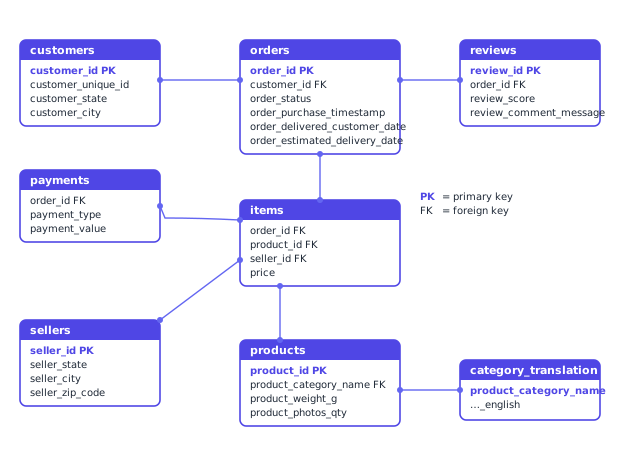
Agenda
| Time | Block | Topic | Lesson |
|---|---|---|---|
| 00:00–00:30 | Hour 1 | SELECT, FROM, WHERE, ORDER BY, LIMIT | Lesson 1 |
| 00:30–01:00 | Hour 1 | Aggregation: GROUP BY, HAVING, the five aggregates | Lesson 2 |
| 01:00–01:10 | Break | ||
| 01:10–01:50 | Hour 2 | Joins: INNER, LEFT, multi-table, anti-join | Lesson 3 |
| 01:50–02:00 | Break | ||
| 02:00–02:30 | Hour 3 | CTEs & CASE: multi-step queries | Lesson 4 |
| 02:30–02:55 | Hour 3 | NULLs, types & SQLite quirks | Lesson 5 |
| 02:55–03:00 | Self-test | 12-question gate-check | Self-test |
| 03:00–04:00 | Hour 4 | Capstone | Capstone |
What you’ll be able to do
By the end of today, given a relational database with 8 tables you’ve never seen before, you can:
- Read its schema and write
SELECT … FROM … WHEREto inspect any table - Aggregate with
GROUP BYto answer “X by Y” questions — pivot tables, in 3 lines - Join 3+ tables to ask cross-table questions
- Use a
LEFT JOIN … IS NULLto find “missing things” — orders without reviews, products never sold - Break a complex question into a recipe of CTEs
- Handle NULLs and empty-string CSV gotchas without getting silently wrong answers
Lessons
Practice is folded into each lesson as collapsible “Try it yourself” boxes — read the concept, attempt the drill, reveal the solution.
Self-test
When you’ve worked through all five lessons, take the 12-question self-test to confirm you’re capstone-ready. ~15 minutes.
Capstone task for today
../../capstone/day2_sql/README.md — produce two CSVs (worst_categories.csv + risky_sellers.csv) that Day 3 will pick up in pandas.
Common pitfalls
- Forgetting
GROUP BYcolumns. Every column inSELECTmust be inGROUP BYor wrapped in an aggregate. SQLite will silently return arbitrary values if you forget. - Joining without
ON. Cross-join explosion. Always include the join condition. column = NULL. Always false. UseIS NULL.- Empty strings, not NULLs, from CSV. In this dataset, “missing” is
= '', notIS NULL. Use the defensive formcol IS NULL OR col = ''when in doubt. - Integer division.
1 / 3 = 0. Multiply by1.0first when computing percentages. SELECT *in production code. Fine while exploring; slow and brittle once a query is reused.